
When a client texts you at 6 a.m. to cancel their 7 a.m. session, you have about sixty minutes to turn an empty hour into paid work. That scramble is the heart of the personal training cancellations problem, and it is one of the quietest drains on an independent trainer's income. The slot does not just sit empty; it takes your revenue, your momentum, and often your morning with it.
The good news is that a last-minute opening is not a loss by default. With the right system, a cancellation becomes a message that goes out to the exact people who want that time, and the first one to reply takes it. This guide walks through why these gaps hurt so much and how to fill them fast, without spending your day glued to your phone.
Why personal training cancellations cost more than you think
Your calendar is your inventory. Unlike a gym selling memberships, a solo trainer sells time in fixed blocks, and every unsold block is gone forever. If you charge seventy dollars a session and lose three late cancellations a week, that is more than ten thousand dollars a year evaporating from your schedule, and that number climbs fast for anyone training small groups or premium clients.
There is a hidden cost too. Late cancellations tend to cluster around the times everyone wants, early mornings, lunch hours, and the after-work rush. Those are your most valuable slots, so when they open up with little notice, you are losing your highest-demand inventory at the worst possible moment to refill it.
A firm cancellation policy helps set expectations, but a policy alone does not put a body back in the open slot. Charging a fee recovers a little money, yet it does nothing for the client who genuinely wanted to train that morning and could not get on your books because it looked full. Filling the gap beats penalizing the person who left it. If you want fewer holes to begin with, that is on you to build: clear reminders the day before, quick confirmations, and a policy clients understand up front all help cut down on last-minute drops.
How to fill personal training cancellations fast
Speed is everything. The moment a session frees up, the clock starts, and your job is to reach the largest pool of ready-to-train clients in the shortest time. Trying to remember who mentioned wanting an earlier slot, then texting them one at a time, is slow and easy to botch when you are between clients on the gym floor.
A better approach is to keep a running list of clients who want more sessions or a better time, then reach all of them at once when something opens. Here is what an efficient fill process looks like in practice:
- Keep a standing waitlist of clients who want extra sessions or an earlier time.
- The instant a slot cancels, send one alert to everyone on that list.
- Let the first person to reply claim the spot, and stop there.
- Confirm the booking and move on, no back-and-forth chasing.
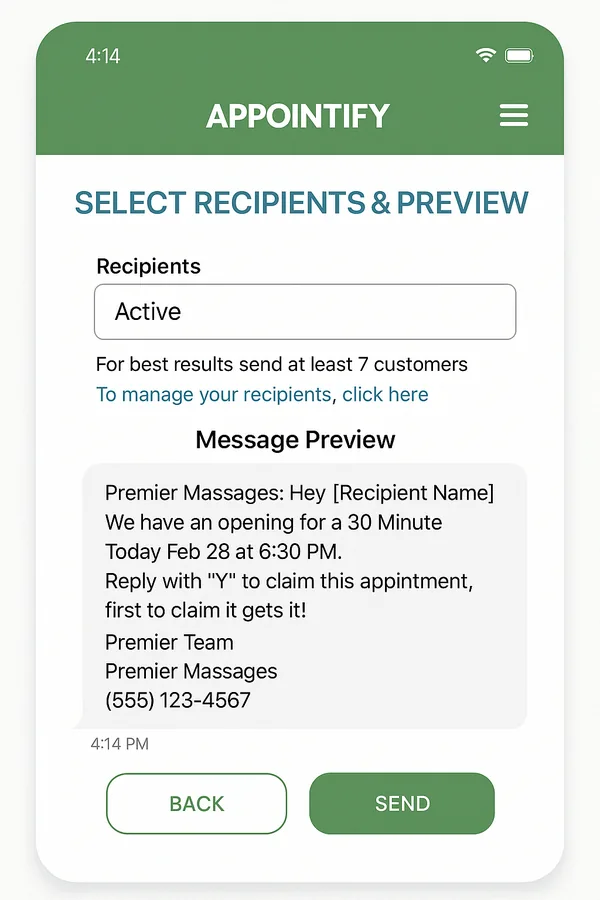
This is exactly the workflow behind Appointify. It is a free app that runs alongside whatever scheduling tool you already use, so you are not ripping out your calendar. When a session opens because a client cancels, you tap once and it instantly texts your in-app waitlist. The first client to reply books that open slot, and you are done. You can see the full picture of how Appointify fills last-minute cancellations without adding a single admin task to your day.
Building a waitlist your clients actually want to be on
The system only works if the waitlist has the right people on it. Fortunately, personal training clients are ideal candidates. Many already wish they could train more often or grab a more convenient time, they just assume you are booked solid. Inviting them onto a waitlist tells them the opposite: when a spot opens, they get first crack at it.
Start by adding your most committed regulars, the ones who train consistently and would happily add a session if their schedule allowed. Then mention the waitlist to newer clients who ask about times you do not currently have open. Framing matters here. You are not selling anything; you are offering them a shortcut to the slots they want most.
Keep the message simple
When an opening goes out, the text should be short and clear: the day, the time, and a quick way to claim it. Clients reply in seconds because there is no phone tag and no guessing. Appointify was purpose-built for this kind of instant text, filling one open appointment at a time, and it is worth exploring a waitlist app for personal trainers that handles the sending and the first-come booking for you. If you also coach clients in other spaces, you can find a waitlist app built for your industry that fits the way that business runs.
Turn empty slots into steady income
Cancellations are never going to disappear from a training business, but they do not have to cost you a dime in lost time. When every open slot triggers an instant alert to clients who already want it, a cancellation becomes a rebooking instead of a hole in your day. That is the difference between reacting to your schedule and running it.
Appointify is free forever, needs no credit card, and sets up in a few minutes. It sits beside your current booking system rather than replacing it, so there is nothing to migrate and nothing to relearn. Start filling your open sessions today.